Bayyinah TV
- 4.6
- Rating
- 100.00K
- Installs
- Free
- Price

 Analysis by App-foxy
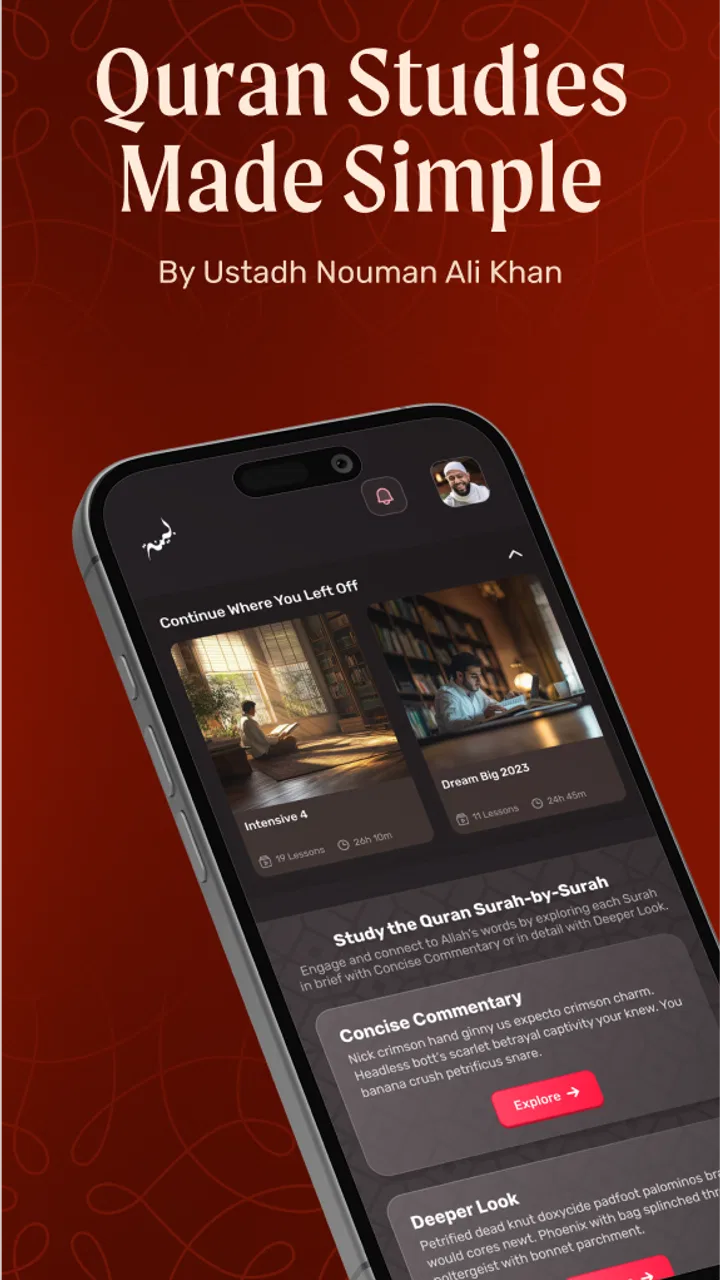
Bayyinah TV is an education app from Bayyinah LLC that gives me a mobile way to reach its video-based learning library. I found it most useful when I wanted to study away from a desk, but the experience depends heavily on getting the account, subscription access, and playback setup working in the right order. That makes it more than a simple install-and-watch app: the first few minutes determine whether the rest feels smooth or unnecessarily frustrating.
The app is free to install and is rated for Everyone, which makes it approachable for families and learners of different ages. Its average rating is 4.6 from around 4.5 thousand ratings, and it has passed 100 thousand installs. Those figures suggest a healthy audience, but they do not remove the practical questions that matter most: how quickly you can start a lesson, what happens when access is not recognized, and whether the mobile format suits the way you prefer to learn.
Getting past the points where users usually get stuck
The first thing I would tell a new user is not to judge the app before checking the basics. A video-learning service can appear broken when the real problem is an account mismatch, an incomplete sign-in, or a connection that is good enough for browsing but not stable enough for continuous playback. I would begin by opening the app on a reliable connection and giving the initial screen time to load fully rather than tapping repeatedly.
You May Also Like

 Blood Strike: 2.5 Anniversary
Blood Strike’s Loadouts Turn Every Drop Into a Tactical Gamble
A close look at Blood Strike’s custom loadouts: how fast access to signature weapons reshapes its battle royale rhythm, rewards preparation, and narrows the gap between fights.

 Pandora - Music & Podcasts
Pandora’s Music Is Easy to Start, but Harder to Recover
Pandora’s strength is its low-effort path from a seed to a station. Its weak spot is how much confidence it asks you to place in connection, setup, and quiet recovery.

 8 Ball Pool
 Is Built on Rivalries, Rematches, and Routine
A close look at the rivalries, rematches, shared routines, and unanswered safety questions that turn a quick pool match into a persistent mobile community.

 Samsung Music
’s Quiet Strength Is Playing What You Already Own
Its reach comes less from spectacle than from dependable access to a personal library. That simplicity is both the app’s strongest retention engine and its ceiling.

 AccuWeather: Weather Radar
AccuWeather Review: A Quick, Clear Forecast for Everyday Decisions
For everyday plans, the best forecast is the one you can understand quickly. AccuWeather makes rain timing, radar, and local conditions easy to act on, with a few trade-offs.

 Hill Climb Racing
Why Hill Climb Racing Still Turns Crashes Into One More Run
A tiny car, a bumpy hill and one more upgrade: Hill Climb Racing keeps resurfacing because its simple chaos makes every near-miss feel personal.
More From Our News Desk



Bayyinah TV is not best understood as a standalone offline course that works without preparation. Its purpose is to bring the wider Bayyinah TV content experience to a phone or tablet, so access matters. If the app opens but the expected material is unavailable, I would first confirm that I am using the same account associated with my Bayyinah access. Switching between email addresses is an easy mistake, especially on a shared device or after reinstalling the app.
Another common point of confusion is the difference between the app being free and all content access being free. The installation costs nothing, while in-app purchases range from $10.99 to $109.99 per item. I would therefore treat the app as a free entry point rather than assuming every lesson or collection is automatically unlocked. Before spending anything, I would make sure the correct account is active and that the purchase screen clearly matches what I intend to access.
The most useful first check is simple: confirm identity before troubleshooting playback. If the wrong account is open, changing networks or reinstalling will not solve the real issue. This small check can save a lot of unnecessary effort.
What the mobile format does well
Once access is working, I like the convenience of having structured Islamic education available in a portable format. A phone is especially practical for short study sessions: I can watch part of a lesson during a quiet break, continue later, or use a tablet when I want a larger view. The app is a better fit for learners who already know they want Bayyinah’s teaching style than for someone looking for a broad, mixed-subject education platform.
The strongest use case is consistent, focused learning rather than casual scrolling. I would set aside a specific period, choose one subject or lesson, and keep notes outside the app if I want to remember key points. That approach turns the phone from a distraction into a dedicated study tool. It also helps because video learning can feel productive even when very little is retained; writing down one or two questions after each session gives the viewing a clearer purpose.
I would not expect the same experience as a full classroom, a printed textbook, or a general video platform. A textbook is easier to skim and annotate. A classroom gives immediate interaction. A general video service may offer more variety and stronger discovery tools. Bayyinah TV’s advantage is concentration on its own educational content, while its trade-off is that it is not designed to replace every part of a broader study system.
Setup checks that prevent avoidable problems
My setup routine would be deliberately boring. I would update the app if an update is offered, check that the device meets the minimum requirement of Android 7.0, and make sure the operating system is not restricting the app’s access to the network. The current version is 4.2.1, so keeping the installation current is sensible when dealing with sign-in or playback behavior.
I would also test the app on the connection I plan to use most often. A home network may work perfectly while a crowded mobile connection struggles. If a lesson starts and stops, I would try a different location before deciding that the application itself is at fault. I would avoid beginning a long study session while the device is low on storage or battery, since those conditions can create a poor experience even when the service is functioning normally.
When a device is shared, I would pay special attention to which account is active. This is not just an administrative detail. It affects what the app recognizes and can make a valid purchase or membership appear missing. I would sign out and back in only after checking the email address carefully, because repeated sign-ins with different accounts can make the situation harder to understand.
For a family, I would decide in advance whether one person or several people will use the device. The Everyone content rating makes the app broadly accessible, but access management still deserves a little planning. Keeping one clear account on a personal device is usually less confusing than repeatedly changing accounts on a shared phone.
There is also a practical screen choice. A phone is fine for a quick lesson, but a tablet is more comfortable for longer viewing and note-taking. If I am studying detailed material, I would position the device at eye level and use headphones only when they genuinely improve concentration. These are small choices, yet they affect whether a mobile lesson feels like serious study or background audio.
Recovering a stalled workflow without making it worse
When something goes wrong, I would use a clean sequence instead of trying several fixes at once. First, I would stop playback and return to the main screen. Then I would check the connection, reopen the lesson, and see whether the same problem happens with another piece of content. Testing a second lesson is useful because it separates a broad access problem from an issue limited to one item.
If the app does not recognize access, I would verify the account before reinstalling. If it loads slowly, I would give it a moment on a stable network rather than repeatedly closing it. If it behaves strangely after an update, I would restart the device and try again. These are general, low-risk steps, but they are more informative when performed one at a time.
Reinstalling can be a last resort, not the first response. It may clear a local problem, but it also means signing in again and possibly repeating the setup process. I would only choose it after confirming the account details I need. Otherwise, the recovery attempt can replace a playback problem with an access problem.
A useful habit is to remember exactly what happened. Did the app fail before sign-in, after selecting content, or only when the lesson began? Did every lesson fail, or just one? Was the device on home Wi-Fi, mobile data, or a public network? Those details make support conversations much more productive than saying only that “the app does not work.”
I would also avoid assuming that a purchase should instantly fix every access issue. The account used during the transaction must correspond to the account used in the app, and store-level purchase processing can take time. Checking both sides calmly is better than buying again. Do not repeat a purchase simply because access has not appeared immediately.
When the app is not the cause
Some problems that look like Bayyinah TV failures actually come from the device or network. Weak Wi-Fi, aggressive battery-saving settings, outdated system software, and limited free storage can all interfere with a video session. If the app works on one network but not another, I would investigate the network first. If other video apps also struggle, that is another strong clue that the phone or connection is the more likely source.
Account confusion is another outside factor. A user may have more than one email address, a family member may have completed a transaction, or the app may have been reinstalled under a different store account. In that situation, the correct response is careful account checking, not repeated tapping or repeated payment attempts.
There is also a difference between wanting a feature and finding a fault. Someone who expects downloadable lessons, extensive note tools, live classroom interaction, or a large general-purpose course catalog may feel disappointed even if the app is operating normally. I would not choose this service on the assumption that it will behave like a textbook reader or a conventional classroom platform. Its value is tied to accessing Bayyinah TV’s educational content through a mobile device.
That distinction matters when comparing alternatives. A general video platform may be more flexible for discovering unrelated teachers and subjects, while a dedicated course website may be easier for long-form study on a computer. A local class may offer discussion and accountability that an app cannot provide. I would choose Bayyinah TV when focused access to Bayyinah’s material is the priority, and I would pair it with notes, a study group, or a teacher when I need interaction and feedback.
Who will get the most from it
I think the app suits learners who prefer guided video teaching and want the freedom to study on a phone or tablet. It is also useful for people who already use Bayyinah TV and want a more convenient mobile doorway into the same content. The free installation lowers the barrier to trying the experience, though the paid access structure means users should understand what they are unlocking before committing money.
A realistic routine might look like this: after dinner, I choose one lesson, watch with notifications muted, and write down a single point that needs further thought. The next day, I return to that point before starting new material. This is more effective than letting several lessons play in the background, because the app becomes part of a repeatable learning habit rather than another source of passive viewing.
I would be more cautious about recommending it to someone who needs formal assignments, progress records, direct teacher responses, or a fully offline workflow. I would also suggest another option to a user whose main goal is broad academic education outside the content offered by Bayyinah. The app has a clear identity, and that focus is helpful for the right learner but limiting for someone seeking an all-in-one education tool.
Parents and families may appreciate the Everyone rating, but I would still decide how the device is used and whether viewing happens with guidance. An age rating describes general suitability; it does not create a study plan or replace a parent’s judgment about how a child learns best.
My practical verdict after weighing the friction
Bayyinah TV is a worthwhile education app when its specific purpose matches what I want: convenient mobile access to Bayyinah LLC’s learning content. I value the focused subject area and the ability to build short study sessions around a phone or tablet. The experience becomes much better when I treat account verification, connection quality, and purchase recognition as part of setup rather than as afterthoughts.
Its limitations are equally clear. It is not the best replacement for a classroom, a searchable general video library, or a textbook with detailed annotation. Users who expect every feature to be available immediately after a free install may also run into confusion around paid access. The app can be perfectly suitable while still not being the right learning format for every person.
For me, the decision comes down to consistency and purpose. If I want Bayyinah TV content in a portable form and am willing to establish a clean account and study routine, I would recommend trying it. If I need offline-first learning, formal interaction, or a wide range of unrelated subjects, I would look elsewhere or use this app alongside another tool.
The current release, version 4.2.1, supports a straightforward recommendation: install it, confirm the device requirement, sign in carefully, test playback before paying for access, and begin with a manageable lesson routine. That approach gives the app a fair test and makes it easier to tell genuine service problems from setup friction. In the right hands, it is a focused companion for mobile Islamic education rather than a complete learning system on its own.
FAQs for Bayyinah TV
01What is Bayyinah TV?
Bayyinah TV is an Islamic learning and education platform focused on helping users understand the Qur’an and Arabic through structured video lessons. Its content is associated with Ustadh Nouman Ali Khan and Bayyinah Institute, and generally includes courses, lecture series, and study materials designed for different levels of learners. It is intended for users who want guided religious education rather than casual entertainment.
02What can I watch or study on Bayyinah TV?
The platform offers lessons covering Qur’anic Arabic, tafsir, surah explanations, Islamic studies, and related educational topics. Depending on the current catalog, users may find complete courses, individual lectures, playlists, and learning series that can be watched at their own pace. The amount and organization of content may change over time, so checking the latest library and course descriptions is recommended before subscribing.
03Is Bayyinah TV free to use?
Bayyinah TV may provide some introductory or sample material at no cost, but access to its full collection typically requires a paid subscription or membership. Pricing, billing periods, promotions, and available plans can vary by country, platform, and time. Before downloading or subscribing, review the payment screen carefully, including renewal terms, trial conditions, and how cancellation works through Android, iOS, or the official website.
04Can I use Bayyinah TV on Android and iPhone?
Bayyinah TV is designed to be accessible on modern mobile devices, including Android phones and iPhones, although exact compatibility depends on the current app version and your operating system. After installation, you may need to sign in with an account to access subscriber content. Users should also verify device requirements, app permissions, and whether their preferred features are available equally across mobile and web versions.
05Does Bayyinah TV support offline viewing?
Offline viewing availability can depend on the specific Bayyinah TV app version, subscription plan, and the content selected. Some streaming services allow lessons to be temporarily downloaded for use without an internet connection, while others require an active connection at all times. If offline study is important to you, check the app’s current download options and restrictions before subscribing, especially for travel or limited-data situations.
Pros
- Clear
- structured lessons on Quranic Arabic and Islamic studies.
- Content is suitable for both beginners and advanced learners.
- Video library supports flexible
- self-paced study.
- Courses feature experienced and engaging instructors.
- Useful for building a consistent personal learning routine.
Cons
- Most premium lessons require a paid subscription.
- The large content library can feel difficult to navigate initially.
- Some lessons may be too detailed for casual viewers.
- Limited interactive features compared with dedicated learning apps.
- Availability of certain content may vary by region or subscription plan.

Bayyinah TV
Gallery